A Step in the Right Direction
Meta (FB) announced a number of new products last night, a 2nd generation of the company’s Ray-Ban AI headsets and similarly equipped Oakley’s, and an entertainment hub for Meta Quest users, but what we have been waiting to see was the 1st iteration of the company’s Meta Ray-Ban’s with a display, an actual AR device, rather than a headset with a camera that are in the shape of glasses. We have no problem with those who use existing Meta Ray-Bans, but to us they are little more than connected headphones. Once you add a display, the options increase considerably. You don’t have to listen to a voice read text to you and you don’t have to guess as to whether the picture you just took captured what you wanted, you can see things on the display.
The glasses themselves are a bit bulkier and heavier than regular Meta Ray-Bans but not so much as to be obvious, but they do have some differences. The most obvious is the display, a single LCoS (Liquid Crystal on Silicon) 600x600 full color projector that sits on the bottom of the right lens and gets projected onto the user’s eye lens through a reflective waveguide that is built into the lens itself. The waveguide is constructed of partially reflective mirrors that move the image from the projection point, through the lens, to the user’s eye. The user sees the image as a high resolution display a short distance in front of the right eye, just a bit outside of your direct gaze so that it does not obstruct the user’s view of the real world. The user lowers their gaze to directly view the image.
We note that due to the fact that the display is monocular (one-eye) it has been described as ‘ghostly’, something all monocular systems must deal with. We expect in order to keep the cost under a certain price point and reduce weight, the decision was made to use only one projector, although the $800 price point is still above our expectations. We note that the company promotes the device as ‘non-intrusive’, meaning the image does not dominate the user’s view, but there is a fine balance between image detail and clarity and the need to make sure the user is not distracted by the image. The image itself has a 20 degree FOV against a ~200 degree total FOV and is said the appear like a 13” monitor display in front of the user.
While we have yet to try it, the glasses come with a ‘neural wristband’ which adds a way of issuing commands to the glasses without using voice or pressing buttons. The wristband uses electromyography to detect muscle movement pattern signals using sensors in the wristband. The wristband processor translates these patterns into commands, allowing for hands-free control of the device, removing the need for ‘talking’ to the glasses to get them to perform application operations. The wristband processor has been trained on thousands of participants and is expected to be usable immediately, without extensive training.
The glasses themselves are a bit bulkier and heavier than regular Meta Ray-Bans but not so much as to be obvious, but they do have some differences. The most obvious is the display, a single LCoS (Liquid Crystal on Silicon) 600x600 full color projector that sits on the bottom of the right lens and gets projected onto the user’s eye lens through a reflective waveguide that is built into the lens itself. The waveguide is constructed of partially reflective mirrors that move the image from the projection point, through the lens, to the user’s eye. The user sees the image as a high resolution display a short distance in front of the right eye, just a bit outside of your direct gaze so that it does not obstruct the user’s view of the real world. The user lowers their gaze to directly view the image.
We note that due to the fact that the display is monocular (one-eye) it has been described as ‘ghostly’, something all monocular systems must deal with. We expect in order to keep the cost under a certain price point and reduce weight, the decision was made to use only one projector, although the $800 price point is still above our expectations. We note that the company promotes the device as ‘non-intrusive’, meaning the image does not dominate the user’s view, but there is a fine balance between image detail and clarity and the need to make sure the user is not distracted by the image. The image itself has a 20 degree FOV against a ~200 degree total FOV and is said the appear like a 13” monitor display in front of the user.
While we have yet to try it, the glasses come with a ‘neural wristband’ which adds a way of issuing commands to the glasses without using voice or pressing buttons. The wristband uses electromyography to detect muscle movement pattern signals using sensors in the wristband. The wristband processor translates these patterns into commands, allowing for hands-free control of the device, removing the need for ‘talking’ to the glasses to get them to perform application operations. The wristband processor has been trained on thousands of participants and is expected to be usable immediately, without extensive training.
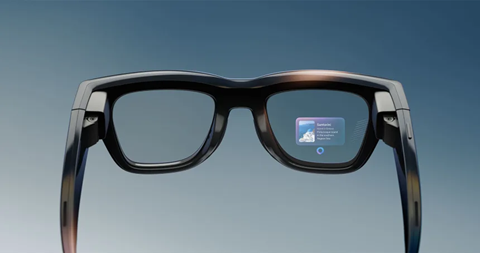
Figure 1Meta Ray-Ban Display Glasses Source: Meta
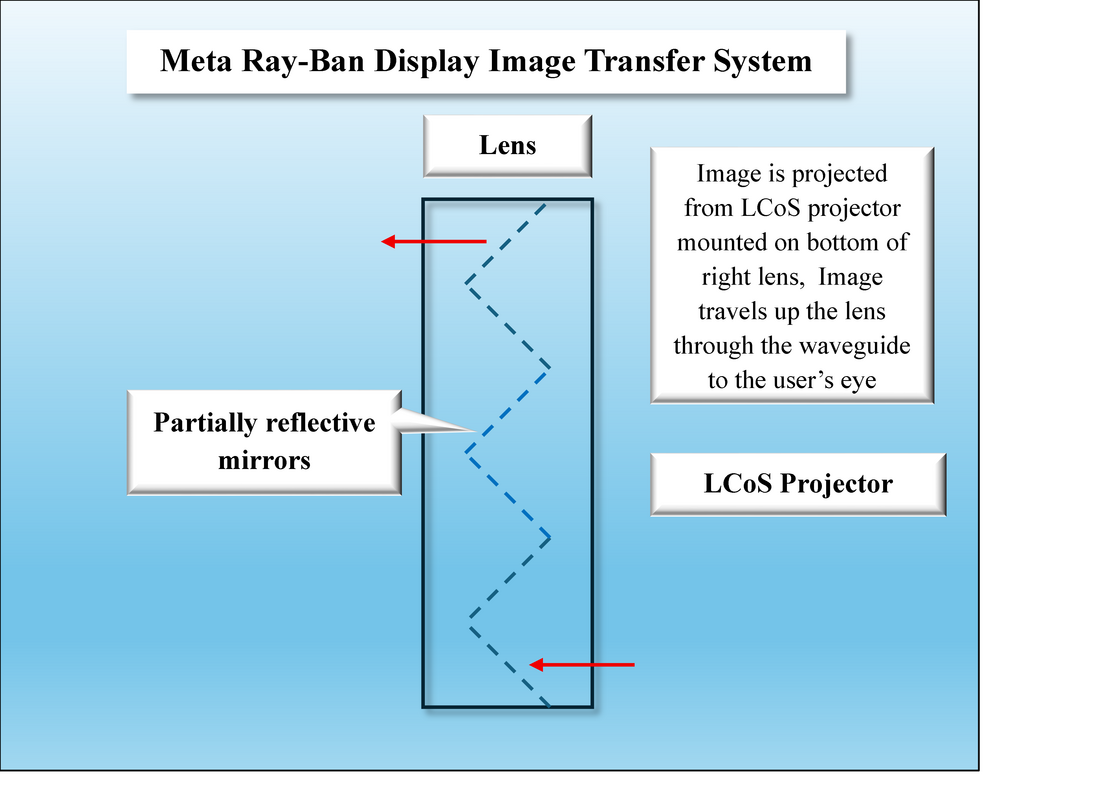
Meta Ray-Ban Display Image Transfer System - Source: SCMR LLC
So you know how it works, but what can it do, other than relieving you of the incredibly difficult chore of taking your smartphone out of your pocket…
“Is everything all right?”
You whisper back,
“Yes, they wanted me to stay late tomorrow night to run a meeting, but I told them no. They have some nerve calling at 9:30 in the evening the day before!”
With the new Meta Display glasses when you feel that buzz you just slip on the glasses and using the wristband, navigate to the messaging app, display it in your field of view and read the message. To respond, you write the response on your leg or the popcorn box (any flat surface) using gestures via the wristband. You ask the AI (no voice) to check for spelling or structure, and you send it, without anyone the wiser. You keep the glasses on, just in case you get a response, with the display turned off (for the time being) and you return to watching the movie, without losing context, as your left eye and ears were still watching the movie and feeding your brain with bits of clues to keep you in touch with the plot
The problem is that we see the device as over the $500 ($499 sounds better) sweet spot, and while it certainly offers the convenience of the display, which enhances some of the applications, it is still a smartphone adjunct and does not have that new application that will convince users that they must have such a device, regardless of cost. If it were $499, more would consider it in its present state, but until the price comes down or new applications are added we are not convinced that “staying in the moment” is worth $800, although it is a great step in the right direction, with a few more steps to go.
- Directions – The glasses use the Bluetooth connection to your smartphone to access a number of location systems to provide the user with a turn-by-turn walking guide to your destination, along with a map of the immediate area. Meta AI pinpoints your location and calculates the route. The glasses provide a ‘glanceable’ image, rather than a fully immersive map, along with prompts for turns, street names and other pertinent information, allowing you to avoid having to hold your phone and constantly look down at the display while walking. While the glasses have their own GPS system, they are essentially a ‘remote display’ for your phone’s navigation system.
- Meta AI – The Meta AI is always available to provide answers or other information via a Bluetooth link to your phone. Your voice requests are sent to Meta’s cloud servers for processing and the query answers are either shown on the display or reported via voice. Most AI processing (other than internal functions) are done off-site using Meta’s infrastructure.
- Messaging – As Meta owns WhatsApp, Facebook Messenger and Instagram Direct, messaging is an important focus forf the glasses. Since you can communicate with the glasses without using your voice, the scenario below will no longer happen…
“Is everything all right?”
You whisper back,
“Yes, they wanted me to stay late tomorrow night to run a meeting, but I told them no. They have some nerve calling at 9:30 in the evening the day before!”
With the new Meta Display glasses when you feel that buzz you just slip on the glasses and using the wristband, navigate to the messaging app, display it in your field of view and read the message. To respond, you write the response on your leg or the popcorn box (any flat surface) using gestures via the wristband. You ask the AI (no voice) to check for spelling or structure, and you send it, without anyone the wiser. You keep the glasses on, just in case you get a response, with the display turned off (for the time being) and you return to watching the movie, without losing context, as your left eye and ears were still watching the movie and feeding your brain with bits of clues to keep you in touch with the plot
- Audio – A 5-point microphone array helps pick-up voices and reduces wind noise while built-in speakers play back music or audio without blocking your ears from outside conversation, Again, all functions can be controlled with the wristband.
- Video – The glasses have a 12MP ultrawide camera for photos and videos and the display acts as a viewfinder along with zoom. Without the display, you pointed your head in the general direction of the subject but had to look at your smartphone display to see what the actual image or video looked like, which often meant taking another shot or missing the chance. Now the viewfinder shows exactly what you are shooting.
- Translation - The glasses can perform live translation of conversations. The microphone array listens to the person you are speaking with and can either provide a translated audio of what they're saying or display real-time captions of the translated speech on the display. The glasses can also capture your side of the conversation and translate into another language, but your foreign partner would have to use your phone to see the translation. Currently English, Spanish, French, Italian, German, and Portuguese are available. In some cases a downloadable language pack can make use of on-phone translations, but in most cases the conversation is sent to your phone, then to Meta AI servers, then back to your phone and to the glasses. The translation system can also be used to translate a sign, menu, or any document with text and show the translation on the display or read it to the user.
The problem is that we see the device as over the $500 ($499 sounds better) sweet spot, and while it certainly offers the convenience of the display, which enhances some of the applications, it is still a smartphone adjunct and does not have that new application that will convince users that they must have such a device, regardless of cost. If it were $499, more would consider it in its present state, but until the price comes down or new applications are added we are not convinced that “staying in the moment” is worth $800, although it is a great step in the right direction, with a few more steps to go.

Figure 3 - More Steps... - Source: SCMR LLC, Gemini
 RSS Feed